Years ago, I combined and modified several pieces of Perl code to create a Windows Event Log backup utility. The original version was based partly on an Event Log script included with some Windows Perl distributions.
This version can:
- Back up Windows Event Logs to the
C:,D:, orE:drive. - List the fixed drives available on the computer.
- Create the required backup directories automatically.
- Organize each Event Log in its own directory.
- Add the date and time to each backup filename.
- Clear each Event Log after it has been backed up.
Warning: This script clears the selected Windows Event Logs after creating the backup files. Test it carefully before using it on a production system.
Limitations
The destination drive letters are hard-coded into the script. I originally wanted the drive selection to be generated dynamically from the available fixed drives, but the hard-coded options were sufficient for my purposes.
Error handling is also limited. Running the script without an option displays the help screen. However, entering an unsupported option can result in an error because the command is not defined in the %commands hash.
This is an older script intended primarily for archival and reference purposes. It was written for Windows systems using the traditional .evt Event Log format.
Usage
Run the script with one of the following options:
bel c
bel d
bel e
bel -l
bel -h
Available commands:
| Command | Description |
|---|---|
c |
Back up the Event Logs to the C: drive |
d |
Back up the Event Logs to the D: drive |
e |
Back up the Event Logs to the E: drive |
-l |
List the available fixed drives |
-h |
Display the help screen |
Perl Script
use Win32::EventLog;
use Time::localtime;

$version = "1.00";
$year    = 2011;
$build   = "2011-05-12";
$myServer = ".";    # Local computer

my %commands = (
    c  => \&cdrive,
    d  => \&ddrive,
    e  => \&edrive,
    -l => \&listdrives,
    -h => \&help
);

if ($#ARGV != 0) {
    print "\nBackup Event Logs $version Copyright (c) $year ";
    print "it.megocollector.com $build\n";

    print "\nUsage: bel <command>\n";
    print "\n<commands>\n";
    print "  c: Backup Event Logs to c drive\n";
    print "  d: Backup Event Logs to d drive\n";
    print "  e: Backup Event Logs to e drive\n";
    print " -l: List valid drives\n";
    print " -h: Help\n";
    exit;
}

$commands{$ARGV[0]}->();

sub cdrive {
    $backupDrive = "c";
}

sub ddrive {
    $backupDrive = "d";
}

sub edrive {
    $backupDrive = "e";
}

sub listdrives {
    # Sources:
    # http://www.dreamincode.net/code/snippet2887.htm
    # http://accad.osu.edu/~mlewis/Class/Perl/perl.html
    # http://www.webmasterkb.com/Uwe/Forum.aspx/perl/9239/List-hard-drives-on-remote-servers

    use Win32;
    use Win32::OLE 'in';

    my @driveTypes = (
        "Unknown",
        "Removable",
        "Fixed",
        "Network",
        "CDRom",
        "Ram Disk"
    );

    my $obj = "Scripting.FileSystemObject";
    my $fs  = Win32::OLE->new($obj);
    my $drives = $fs->Drives;

    print "\nDrive Letter Report:\n";

    foreach my $drv (in($drives)) {
        $typ = $drv->{DriveType};

        my $size = sprintf(
            "%3.2f",
            $drv->{TotalSize} / 1073741824
        );

        next unless $drv->{DriveType} == 2;

        print $drv->{DriveLetter}
            . ": - "
            . "$driveTypes[$typ] - $size GB\n";
    }

    exit;
}

sub help {
    print "\nBackup Event Logs $version Copyright (c) $year ";
    print "it.megocollector.com $build\n";

    print "\nUsage: bel <command>\n";
    print "\n<commands>\n";
    print "  c: Backup Event Logs to c drive\n";
    print "  d: Backup Event Logs to d drive\n";
    print "  e: Backup Event Logs to e drive\n";
    print " -l: List valid drives\n";
    print " -h: Help\n";
    exit;
}

$year  = localtime->year() + 1900;
$month = localtime->mon() + 1;
$day   = localtime->mday();
$hour  = localtime->hour();
$min   = localtime->min();
$sec   = localtime->sec();

my $dates = join("-", $year, $month, $day);
my $time  = join(".", $hour, $min, $sec);
my $date  = join("_", $dates, $time);
my $dest;

# Create the main Event Log backup directory if it does not exist.

if (-d "$backupDrive:\\BackupEventLogs") {
    print "";
}
else {
    mkdir("$backupDrive:\\BackupEventLogs") || print $!;
}

for my $eventLog (
    "Application",
    "System",
    "Setup",
    "Security",
    "Directory Service",
    "DNS Server",
    "File Replication Service",
    "Internet Explorer",
    "Media Center"
) {
    my $filename = join("-", $date, $eventLog);

    $handle = Win32::EventLog->new($eventLog, $myServer)
        or die "Can't open $eventLog on $myServer\n";

    # Create a separate directory for each Event Log.

    if (-d "$backupDrive:\\BackupEventLogs\\$eventLog") {
        print "";
    }
    else {
        mkdir("$backupDrive:\\BackupEventLogs\\$eventLog") || print $!;
    }

    $dest = "$backupDrive:\\BackupEventLogs\\$eventLog\\$filename.evt";

    $handle->Backup($dest)
        or warn "Could not backup and clear the $eventLog "
              . "EventLog on $myServer ($^E)\n";

    print "$eventLog Copied\n";

    $objWMI = Win32::OLE->GetObject(
        'winmgmts:\\\\' . $myServer . '\\root\\cimv2'
    );

    $colLogs = $objWMI->ExecQuery(
        'Select * from Win32_NTEventlogFile Where '
        . 'Logfilename = \'' . $eventLog . '\''
    );

    foreach my $objLog (in $colLogs) {
        $objLog->ClearEventLog();
        print "$eventLog Cleared\n";
    }

    $handle->Close;
}

exit;
Screenshots
Help Screen

The script was executed without an option, causing the usage and command information to be displayed.
Listing Fixed Drives
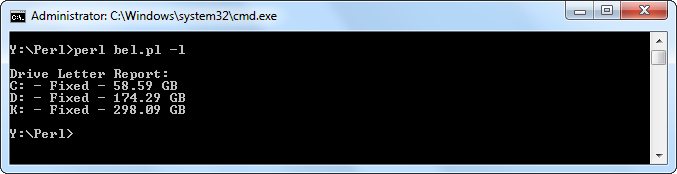
The script was executed with the -l option to display the available fixed drives.
Backing Up to the C Drive
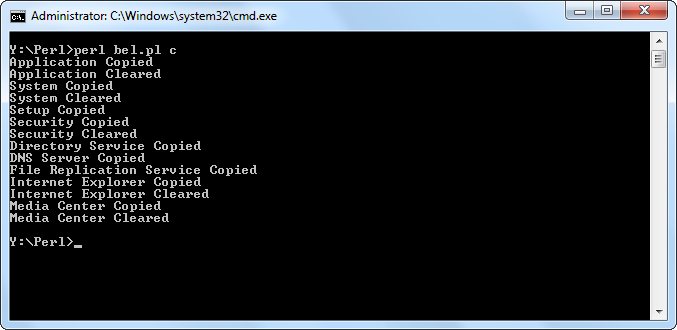
The script was executed with the c option. Each available Event Log was backed up and then cleared.
Backup Directory Structure
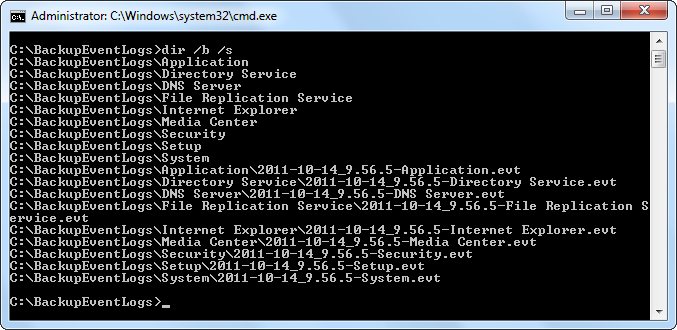
The resulting directory listing shows the folders and .evt files created by the script.