it.megocollector.com

  • Tips and Tricks
  • Linux
  • Scripts
    • AutoIT Scripts
    • INNO Scripts
  • WordPress
  • Misc
  • Software Packaging
  • Windows
  • Media

Windows 7 Bypass the Logon Screen

December 4, 2009

windows-7-box-artFor whatever your reason may be, there are times where you want to just turn on your workstation without having to type in your username and password. In previous operating systems, the command can be typed in the RUN box, which is no longer available to the Windows 7 user. The RUn box can be restored, but that is another article. To bypass the logon screen can be accomplished in just a few steps. However, please read the note at the bottom of this article, you may have to repeat these steps again.

Here are those steps:

  • Go to the Start button -> All Programs -> Accessories -> Command Prompt
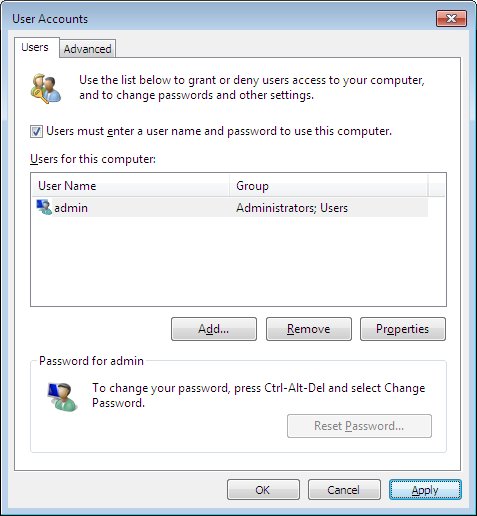
  • Type netplwiz and press Enter.
w7usr-1
  • Uncheck the box next to Users must enter a user name and password to use this computer.
  • Press the Apply button.
  • Another box will appear, prompting for password for the account that you had selected.
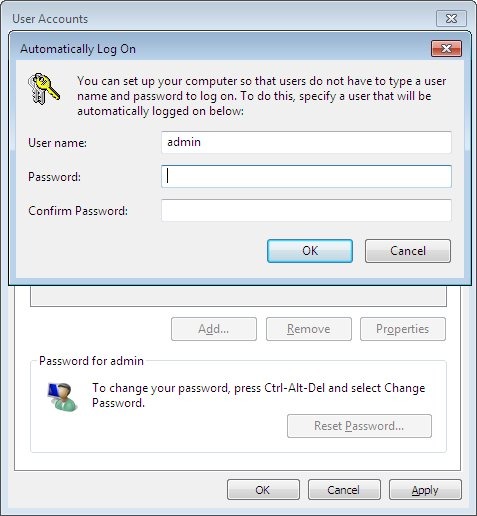
w7usr-2
  • Type in the appropriate password and press OK button.
  • Press OK again.
  • Done.

Note:I noted in an installation that Windows forced a password change at the login window. After doing so, this “broke” the auto login because the passwords no longer matched. An error message will appear at the logon window regarding an incorrect password. To correct this follow the steps again provided above or change your computer policy, for which I have not just yet.

Tagged: login screenlogon screen.Microsoftnetplwizwindows 7

Post navigation

««How to enable the RUN command in Windows 7 Start Menu
How to Change the Microsoft Office 2007 Product Key»»

About Me

...

admin

Welcome to my world! Here you will find information I have collected over the years — things I have found useful or discovered along the way. With over 20 years online, this has grown into my personal knowledge base. If you find something helpful or interesting, even better!

 it.megocollector.com
Experts Exchange

Categories

  • Linux (282)
  • macOS (3)
  • Media (12)
  • Misc (38)
  • Raspberry Pi (3)
  • Scripts (185)
    • AutoIT Scripts (19)
    • INNO Scripts (9)
  • Software Packaging (19)
  • Tips and Tricks (415)
  • Windows (21)
  • Wordpress (44)

Popular

  • i8042prt Event ID 7026 The following boot-start or system-start driver(s) failed to load (114,661)
  • Adobe Reader 9 or Adobe Acrobat 9 can not view PDF files in a Web Browser error and fix (78,142)
  • EPSON Scan jpeg plug-in unable to write to file error and fix (54,024)
  • #1045 – Access denied for user ‘root’@’localhost’ (using password: NO) fix (49,133)
  • Convert mAh to mWh and mWh to mAh for Notebook Laptop Batteries (48,316)
  • Install JDK (Java Development Kit) on a RedHat Linux System (46,141)
  • How to share a folder without password in Windows 10 home network (42,733)
  • Create a 7zip Self Extractor (7zS.sfx or 7z.sfx) (41,597)
  • eHome Infrared Receiver not recognized by Windows XP (31,662)
  • Microsoft Word Accept and Reject Change Options Greyed Out (28,185)
  • Access Red Hat Enterprise Linux 5 with XManager Remote Control (27,330)
  • Setup JBoss on Red Hat Enterprise Linux 5 (RHEL5) Server (23,733)
  • PHP 5.3.2 with IIS6 and FastCGI Installation Guide – Updated (21,998)
  • Unlock the McAfee VirusScan Enterprise 8.5i User Interface (21,468)
  • Internet Explorer 7 Gold RunOnce Removal (20,823)
  • Windows XP SESSION3_INITIALIZATION_FAILED stop error with 0x0000006F fix (19,720)
  • How to automate Selenium scripts (19,289)
  • atibtmon.exe Runtime Error! [Resolved] (19,202)
  • SVCHOST.EXE Application Error 0XC00000FD 0X76A9F4F9 100% CPU Resolved! (19,149)
  • How to enable and configure Java JRE to work in Firefox in CentOS 5 and RHEL 5 Linux (18,075)
  • How to install the Intel 82845G Graphics driver on Microsoft Vista (16,968)
  • Remove WGA Notifications with AutoIT (16,301)
  • How to Setup IIS6 with the Tomcat 5 Connector – Step by Step Guide. (16,078)
  • Accessing JBoss on RHEL/CentOS — Firewall Gotcha (and the Right Way to Handle It) (15,776)
  • Internet Explorer 8 Beta RunOnce Removal (15,032)
  • Use netstat in Linux to determine port conflicts (14,463)
  • Setup JBoss on Ubuntu 8.0.4 LTS Server Edition (14,407)
  • How to Sort Text Using Notepad++ (14,335)
  • EPSON Print CD missing PICSDK.DLL (13,784)
  • DOS Batch – Find and Replace all occurrences of a string with another string (13,323)
Copyright © 2006-2026 it.megocollector.com