Modernizing a Legacy WordPress Database to InnoDB and utf8mb4
Many long‑running WordPress sites still use a mix of MyISAM tables and legacy charsets such as utf8/utf8mb3 or even latin1_swedish_ci. Updating these to InnoDB and utf8mb4 improves reliability, Unicode/emoji support, and consistency across environments.
This article describes a practical, repeatable process using a sample database named example, but the same steps apply to any WordPress site (for example, example.com).
Prerequisites and safety
- Backup the database – take a full SQL dump of the WordPress database
(for exampleexample) before running any of the queries in this article. - Optionally, clone the site to a staging environment and run all changes there first.
- Confirm your MySQL/MariaDB version supports
utf8mb4and
utf8mb4_unicode_520_ci.
Overview
The process has four main steps:
- Align
wp-config.phpwithutf8mb4. - Identify tables that still use MyISAM or non‑
utf8mb4collations. - Convert those tables to InnoDB and
utf8mb4_unicode_520_ci. - Optionally update the database‑level default charset and collation.
All SQL shown here is run against the database example; substitute your own database name where appropriate.
Step 1 – Update wp-config.php to use utf8mb4
First, configure WordPress to use the modern UTF‑8 charset and a Unicode collation for all new tables and connections.
Edit wp-config.php and ensure these lines are present:
define('DB_CHARSET', 'utf8mb4');
define('DB_COLLATE', 'utf8mb4_unicode_520_ci');
Notes:
- This change affects how WordPress creates tables and communicates with the database going forward.
- It does not automatically convert existing tables; that is handled in later steps.
Step 2 – List tables that still need conversion
Next, identify which tables in the example database are not yet using InnoDB and utf8mb4. This diagnostic query filters for tables that either:
- Use an engine other than InnoDB (typically MyISAM), or
- Use a collation that is not based on
utf8mb4.
Run the following SQL:
SELECT
TABLE_NAME,
ENGINE,
TABLE_COLLATION
FROM information_schema.TABLES
WHERE TABLE_SCHEMA = 'example'
AND (
ENGINE <> 'InnoDB'
OR TABLE_COLLATION NOT LIKE 'utf8mb4%'
) ORDER BY TABLE_NAME;
Typical results include:
- Core WordPress tables:
wp_posts,wp_postmeta,wp_options,wp_users,wp_usermeta,wp_comments,wp_commentmeta,wp_terms,wp_term_taxonomy,wp_term_relationships. - Plugin tables that were created years ago using MyISAM or
utf8mb3_unicode_ci/latin1_swedish_ci.
Use this list as the target set for the conversions in Step 3.
Step 3 – Convert individual tables to InnoDB and utf8mb4
For each table returned in Step 2, run an ALTER TABLE to:
- Switch the storage engine to InnoDB.
- Convert the charset to
utf8mb4and the collation toutf8mb4_unicode_520_ci.
Example conversions for core WordPress tables with the standard wp_ prefix:
ALTER TABLE wp_commentmeta
ENGINE=InnoDB,
CONVERT TO CHARACTER SET utf8mb4 COLLATE utf8mb4_unicode_520_ci;

ALTER TABLE wp_comments
ENGINE=InnoDB,
CONVERT TO CHARACTER SET utf8mb4 COLLATE utf8mb4_unicode_520_ci;

ALTER TABLE wp_posts
ENGINE=InnoDB,
CONVERT TO CHARACTER SET utf8mb4 COLLATE utf8mb4_unicode_520_ci;

ALTER TABLE wp_postmeta
ENGINE=InnoDB,
CONVERT TO CHARACTER SET utf8mb4 COLLATE utf8mb4_unicode_520_ci;

ALTER TABLE wp_options
ENGINE=InnoDB,
CONVERT TO CHARACTER SET utf8mb4 COLLATE utf8mb4_unicode_520_ci;

ALTER TABLE wp_terms
ENGINE=InnoDB,
CONVERT TO CHARACTER SET utf8mb4 COLLATE utf8mb4_unicode_520_ci;

ALTER TABLE wp_term_taxonomy
ENGINE=InnoDB,
CONVERT TO CHARACTER SET utf8mb4 COLLATE utf8mb4_unicode_520_ci;

ALTER TABLE wp_term_relationships
ENGINE=InnoDB,
CONVERT TO CHARACTER SET utf8mb4 COLLATE utf8mb4_unicode_520_ci;

ALTER TABLE wp_usermeta
ENGINE=InnoDB,
CONVERT TO CHARACTER SET utf8mb4 COLLATE utf8mb4_unicode_520_ci;

ALTER TABLE wp_users
ENGINE=InnoDB,
CONVERT TO CHARACTER SET utf8mb4 COLLATE utf8mb4_unicode_520_ci;
For plugin tables, follow the same pattern. Example (Action Scheduler and a mailer plugin):
ALTER TABLE wp_actionscheduler_actions
CONVERT TO CHARACTER SET utf8mb4 COLLATE utf8mb4_unicode_520_ci;

ALTER TABLE wp_actionscheduler_claims
CONVERT TO CHARACTER SET utf8mb4 COLLATE utf8mb4_unicode_520_ci;

ALTER TABLE wp_actionscheduler_groups
CONVERT TO CHARACTER SET utf8mb4 COLLATE utf8mb4_unicode_520_ci;

ALTER TABLE wp_actionscheduler_logs
CONVERT TO CHARACTER SET utf8mb4 COLLATE utf8mb4_unicode_520_ci;

ALTER TABLE wp_wpmailsmtp_tasks_meta
CONVERT TO CHARACTER SET utf8mb4 COLLATE utf8mb4_unicode_520_ci;
Repeat as needed for any plugin tables that store readable text.
In some cases, a plugin may intentionally use a binary collation (such as utf8mb4_bin) for exact, case‑sensitive comparisons. These tables can often be left as‑is unless you are resolving a specific collation mismatch.
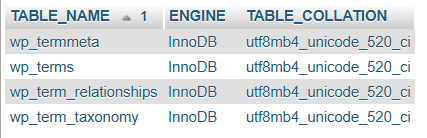
After running your ALTER statements, re-run the diagnostic query from Step 2. When it returns no rows, all tables in example are InnoDB and use an utf8mb4-based collation.
Step 4 – Optionally update the database default charset and collation
If the database example is dedicated to this WordPress site (i.e., no other applications share it), you can also update the database‑level defaults so that future tables inherit the modern charset and collation automatically.
Run:
ALTER DATABASE example
CHARACTER SET utf8mb4
COLLATE utf8mb4_unicode_520_ci;
Or, using another database name:
ALTER DATABASE your_database_name
CHARACTER SET utf8mb4
COLLATE utf8mb4_unicode_520_ci;
This does not modify existing tables; it simply changes the defaults for any new tables created without explicit charset/collation settings.
If the database is shared with older applications that still expect latin1_swedish_ci or other collations, consider leaving the database default unchanged and relying on explicit per‑table settings instead.
Verification and testing
Once all four steps are complete:
- Re-run the Step 2 query and confirm there are no tables with
ENGINE <> 'InnoDB'or non‑utf8mb4collations. - Open the WordPress front‑end and wp‑admin to verify normal operation.
- Test key workflows such as:
- Creating and editing posts and pages.
- Submitting comments.
- Any plugin features associated with converted tables (e.g., scheduled actions, contact forms, downloads, donations).
A successfully modernized database will:
- Use InnoDB for all core and plugin tables.
- Store text in
utf8mb4with a consistent collation (typicallyutf8mb4_unicode_520_ci). - Match the
DB_CHARSETandDB_COLLATEsettings inwp-config.php.