Here’s a project that scratches two itches at once: the practical need for a decent web interface on a file server, and my collector’s fondness for keeping old formats alive.
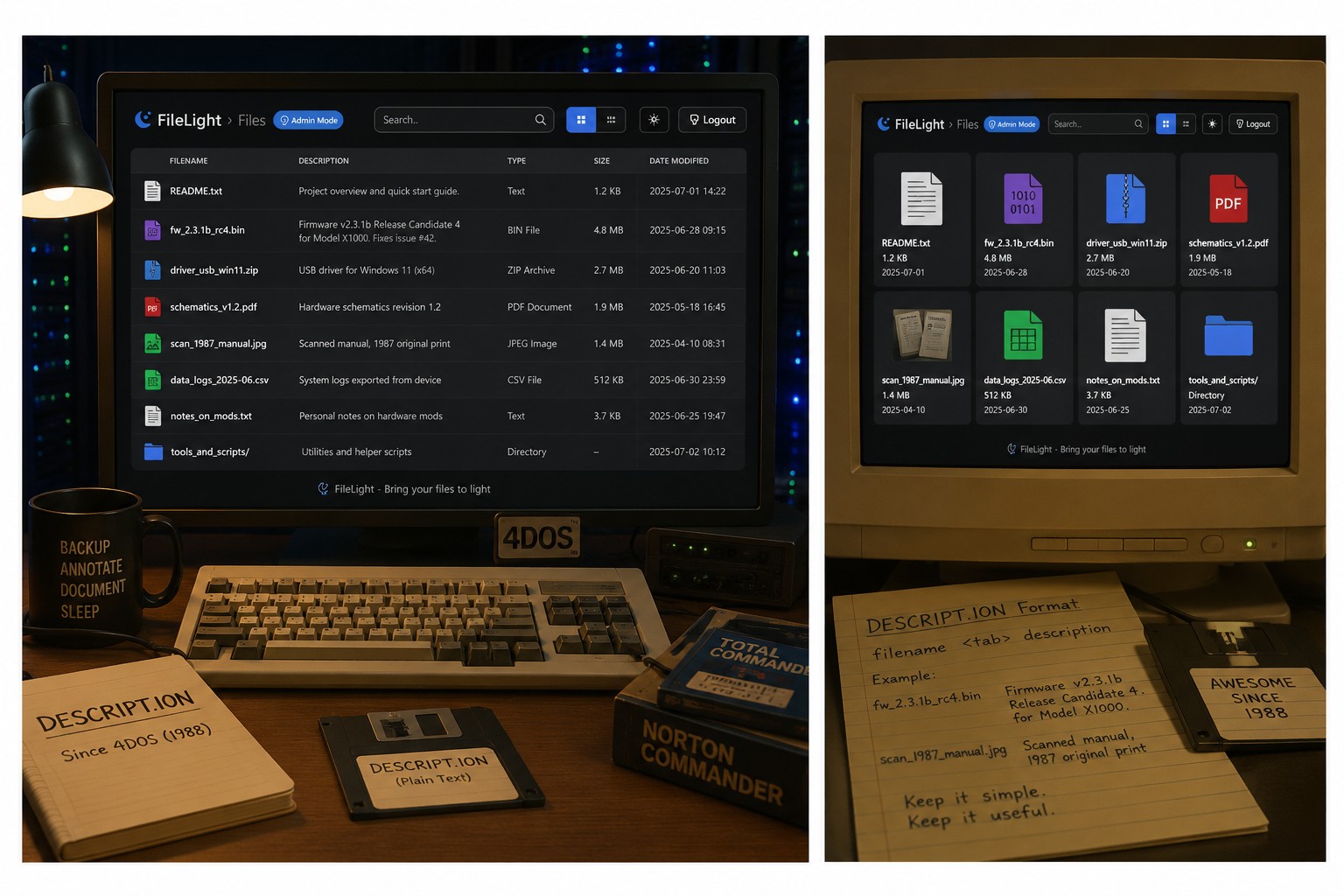
FileLight is a single-file PHP directory browser with a modern UI — grid and list views, dark mode, search, sortable columns, image previews — and its signature feature is inline file descriptions. Not descriptions stored in some proprietary database, but descriptions stored in DESCRIPT.ION files, a plain-text format that dates back to 4DOS in the late 1980s and lived on through tools like Total Commander. If you were annotating your files in the DOS era, FileLight can read those exact files today. It’s free, MIT-licensed, and on GitHub:
The Problem It Solves
Apache and Nginx directory listings are functional but grim: a bare column of filenames with no context. The heavier alternatives (h5ai and friends) look better but tell you nothing about what the files are. If you serve a folder of firmware images, scanned documents, or driver archives, a filename like fw_2.3.1b_rc4.bin is useless without a note explaining which device it’s for and why revision b exists.
FileLight puts a description column right next to every file. Browse the listing, read what each file actually is, and — if you’re logged in as admin — click any description to edit it inline, right in the browser. Empty a description and it’s deleted. No database, no separate admin tool.
The DESCRIPT.ION Format
Descriptions live per directory in a DESCRIPT.ION file: one entry per line, filename followed by whitespace (or a tab, for long filenames), then the description. That’s the whole format, and it’s why it has survived nearly four decades — it’s human-readable, editable in any text editor, greppable from the shell, and portable between tools. FileLight reads the local DESCRIPT.ION for each directory and falls back to the root one when a subdirectory doesn’t have its own.
The practical upshot: your descriptions aren’t locked into FileLight. They existed before it and they’ll outlive it. If you already maintain DESCRIPT.ION files from another tool, FileLight displays them the moment you drop it into the folder. There’s also optional support for a legacy types.json for icon and type mappings if you’re migrating from an older setup.
Modern Where It Counts
The vintage data format is paired with a thoroughly current interface. You get list and grid views with a persistent dark/light theme toggle (preferences are remembered per browser), breadcrumb navigation, live search, and columns sortable by name, description, type, size, or date. Images get hover previews in list view and proper thumbnails in grid view — very handy for folders of scans and photos. Styling is a single CSS file with variables at the top, so re-theming it takes minutes.
Security is handled sensibly for something this small. Path traversal above the install directory is blocked, housekeeping files like index.php, .htaccess, and DESCRIPT.ION itself are hidden from the listing, and the admin password is stored as a bcrypt hash. Like TrustView, it uses the set-plain-text-and-let-the-app-hash-it trick: put a new password in the config and FileLight hashes it and writes it back on next load. The default is admin123 — change it before the server sees the internet.
Deployment Is Three Files
The requirements are almost nothing: PHP 7.4 or newer with no extensions beyond the standard library, plus a CDN include for Bootstrap Icons. Copy index.php, filelight.css, and filelight.config.php into the directory you want to expose, and serve it. For local use, PHP’s built-in server does the job:
php -S localhost:8000
The listing is automatically scoped to the directory containing index.php, so you decide exactly what’s exposed by deciding where the file goes.
Where It Fits
FileLight rounds out the little self-hosted suite I’ve been publishing here: tinyhome-py gives your homelab a landing page, TrustView watches your certificates, and FileLight makes your file shares browsable and — more importantly — understandable. If you’ve got a directory of files that only make sense with annotations, this is the lightest possible way to serve them with context intact.
Grab it from the GitHub repository, and if your DESCRIPT.ION files predate the web itself, I’d genuinely love to hear about it in the comments.